What is API keys?
API keys authenticate MCP clients and REST calls against your workspace. Keys are optional when MCP OAuth is available, but useful for scripts and clients that expect a static Bearer token. Revoke keys immediately if they leak.
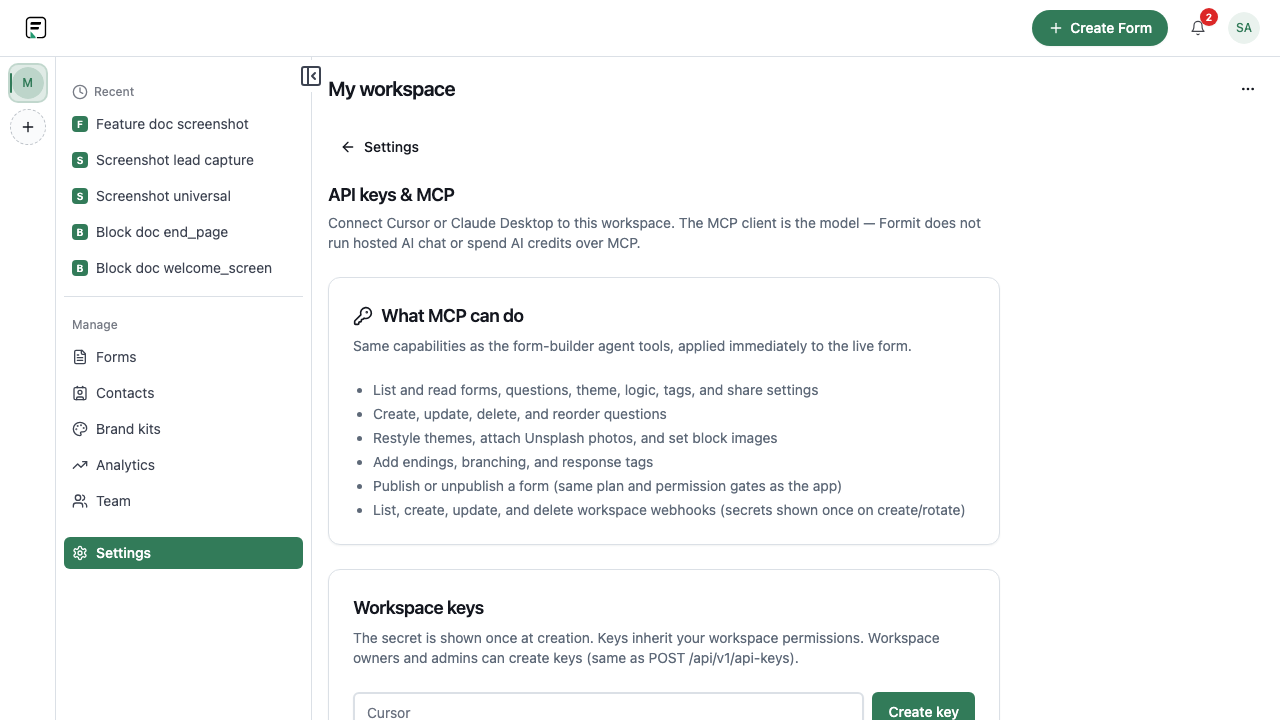
How it works
- Open Dashboard → Settings → API keys & MCP.
- Create a workspace API key with a descriptive label.
- Copy the secret once - it is not shown again.
- Paste the key into your MCP client headers or automation script.
- Rotate or revoke keys when team members leave or a key may be exposed.
Key capabilities
Workspace-scoped secrets
Each key is tied to a workspace context for MCP and API access.
Rotate and revoke
Disable compromised keys without changing your Formit password.
MCP Bearer fallback
Use Authorization: Bearer when OAuth discovery is not supported by your client.
Limitations and plan notes
- Keys inherit workspace permissions - Viewer roles cannot mutate forms through MCP even with a key.
- Treat keys like passwords; Formit shows the secret only at creation time.
Try it in FormitAI
Open the builder, configure this in a real form, publish a version, and share a link or embed. Start free - paid features stay honest about plan gates in the product.
Open FormitAI