What is Form AI assistant (builder chat)?
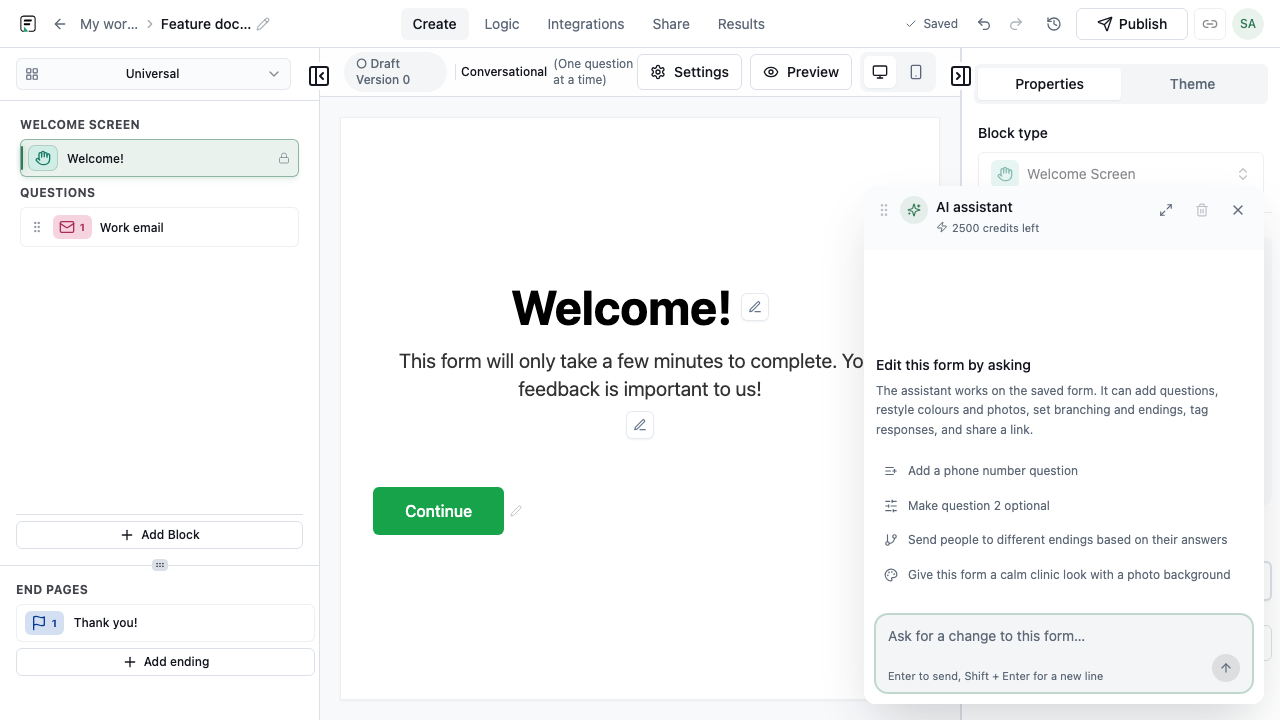
The Form AI assistant is a builder-side chat panel. Describe changes in plain language to add blocks, adjust copy, restyle themes, attach images, or reorganize logic previews before you publish. It is separate from AI follow-ups, which probe respondents during the fill.
How it works
- Open a form in the builder and launch the Form AI chat panel.
- Describe the change you want (new block, theme tweak, copy edit, image placement).
- Review the proposed revision preview on the canvas before accepting.
- Accept or refine the suggestion, then publish when the draft matches your intent.
Key capabilities
Block and copy edits
Add, update, or reorder questions from conversational instructions.
Theme and image previews
Preview theme and Unsplash image changes before applying them to the draft.
Revision hunks
Inspect structured diffs so you know what the assistant will change.
Limitations and plan notes
- Builder AI chat is subject to the same rate limits and permissions as other AI features in the product.
- Not a substitute for AI follow-ups - those run on the live form for respondents.
Try it in FormitAI
Open the builder, configure this in a real form, publish a version, and share a link or embed. Start free - paid features stay honest about plan gates in the product.
Open FormitAI