What is Integrations overview?
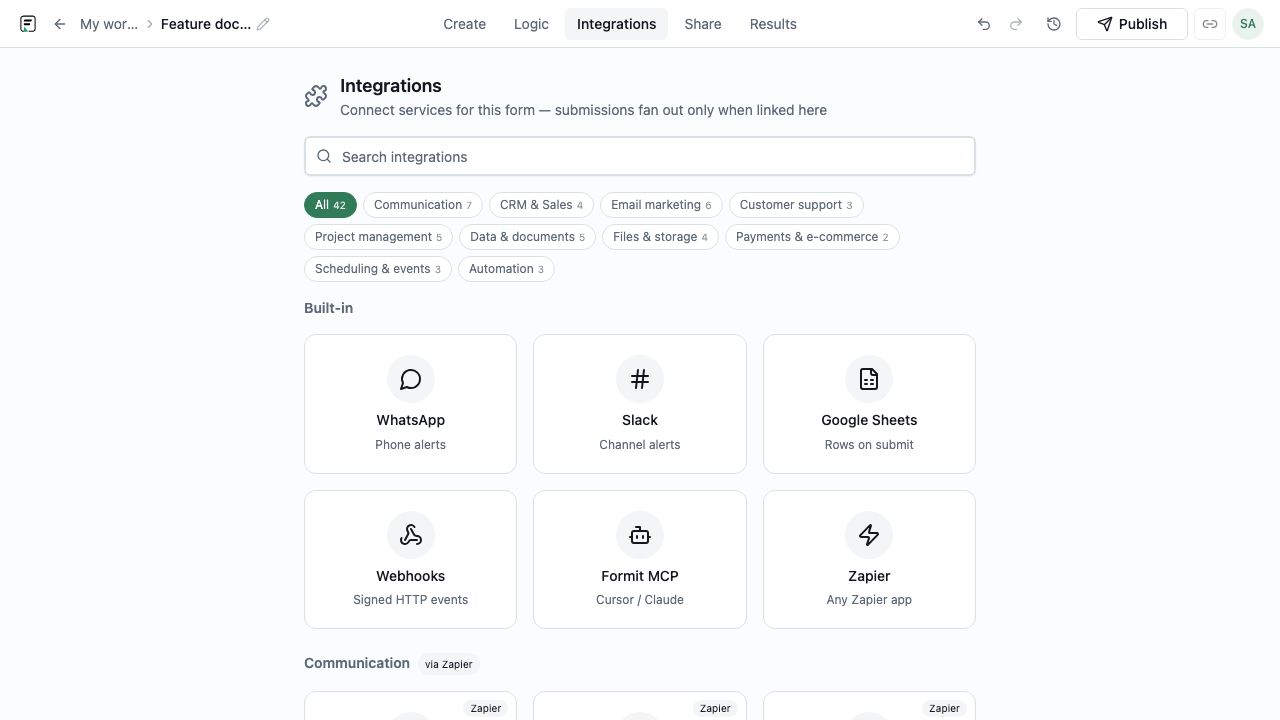
Integrations send or sync activity after someone submits. Formit supports Slack, Google Sheets, WhatsApp, and Zapier as after-submit connectors in the Integrations panel (often Business-tier). Calendly is different: it powers the in-form Schedule block via workspace OAuth (Business-tier), not a generic Slack-style registry row. Integrations are not the same as AI follow-ups, which are in-form probes during the fill.
How it works
- Confirm your plan includes the integration you need (often Business-tier).
- Open the form’s integrations or connected apps settings.
- Connect the destination account (Slack workspace, Sheet, Zapier, Calendly, etc.).
- Map fields or choose notification channels as required by the connector.
- Submit a test response and verify the after-submit (or booking) behavior.
- Publish or keep the live form running so production submissions flow through.
Key capabilities
Slack
Notify a channel or destination when submissions arrive.
Google Sheets
Send submission data to a spreadsheet for ops and reporting.
WhatsApp and Zapier
Reach messaging and broader automation tools from Formit after submit.
Calendly (Schedule block)
Calendly connects through the Schedule block and workspace OAuth - not the same Integrations registry row as Slack. Requires Business-tier for the Calendly connection.
After-submit automation
Integrations focus on what happens after submit (plus scheduling via Calendly) - not in-form AI probes.
Benefits
- Route leads to the tools your team already monitors.
- Reduce manual copy-paste from Results into spreadsheets or chat.
- Book meetings in-flow with Calendly where Schedule blocks are used.
- Extend to niche tools through Zapier when a native connector is not enough.
Use cases
- Posting demo requests to a Slack sales channel.
- Appending research answers to a Google Sheet for analysts.
- Triggering a Zapier workflow that creates a CRM task after submit.
Example workflow
A B2B team on a Business-tier plan connects Slack and Google Sheets on a demo form. Each submit notifies #sales and appends a Sheet row. Separately, they enable AI follow-ups on a discovery question - those probes stay in-form and never replace the Slack integration.
Tips and best practices
- Test with a real submission before announcing the form internally.
- Keep field mapping lean - only send columns your destination needs.
- Remember: AI follow-ups ≠ integrations; configure each for its job.
Limitations and plan notes
- Slack, Google Sheets, WhatsApp, and Zapier after-submit connectors are often Business-tier gated.
- Calendly uses the Schedule block plus workspace OAuth (Business-tier) - not the same setup path as Slack.
- Integrations are after-submit paths - not email AI follow-ups or in-form probes.
- Destination-side permissions and API limits can still block delivery even when Formit is configured correctly.
Frequently asked questions
- Which integrations does Formit call out?
- Slack, Google Sheets, WhatsApp, Calendly, and Zapier are the primary named connectors.
- Are integrations the same as AI follow-ups?
- No. Integrations handle after-submit (or scheduling) workflows. AI follow-ups are in-form probes during the fill.
- Do I need a higher plan?
- Often yes - many integrations are Business-tier gated. Check your plan before relying on a connector.
Try it in FormitAI
Open the builder, configure this in a real form, publish a version, and share a link or embed. Start free - paid features stay honest about plan gates in the product.
Open FormitAI